Gaming Neon Signs: Best Ideas for Gaming Rooms & Setups
By Neon Artist · 11 November 2026
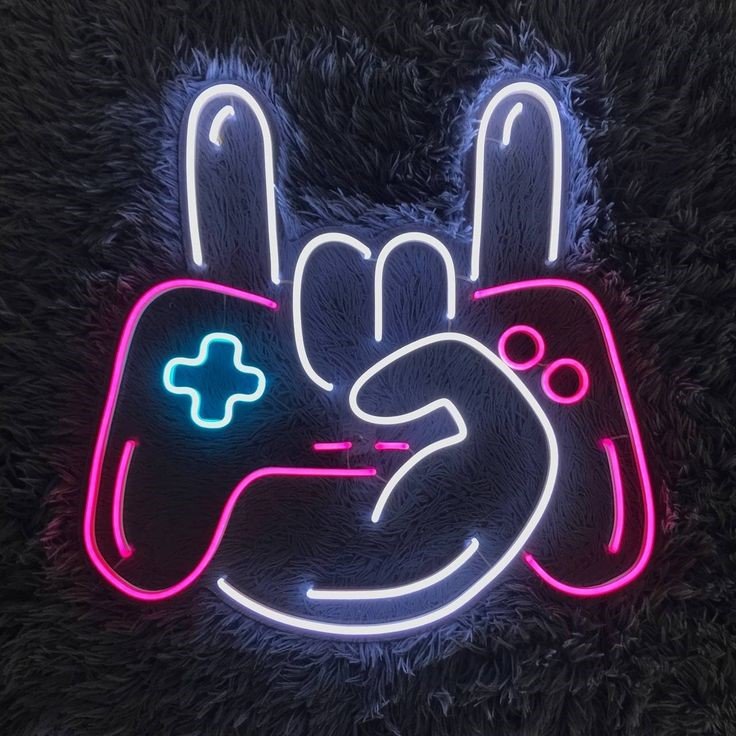
A gaming room is more than a desk and a screen. The best setups feel personal, comfortable and visually connected. A neon sign can help create that identity by adding a gamer name, controller symbol, favourite phrase or bold wall feature behind the setup.
This guide shares practical gaming neon sign ideas for bedrooms, streaming corners and dedicated gaming rooms. It also explains how to choose the right size, colour, placement and design so the sign improves the setup instead of making it feel cluttered.
Why Gaming Neon Signs Work So Well
Gaming setups usually combine screens, keyboards, wall décor and ambient light. A sign gives the wall one clear focal point and can make the whole setup look more finished. It also creates a stronger background for streams, reels, photos and video calls.
The most effective gaming signs are simple and readable. A short gamer tag or recognisable symbol often works better than a long quote that becomes hard to read on camera.
1. Game Controller Neon Sign
A controller design is one of the most recognisable gaming symbols. It works well above a monitor, beside a television setup or on a side wall near a console station.
For a ready gaming-themed option, explore the Game Controller Neon Sign. Keep enough empty space around the sign so the shape remains clear even when the screen and desk lights are on.
2. Custom Gamer Name Sign
A gamer name or online handle makes the setup more personal. This works especially well for streamers, creators and players who use the same name across gaming platforms and social media.
Use a short, readable font and consider how the name will look in a camera frame. Very decorative lettering may be harder to read during a stream. A custom gamer name can be created through the Custom Neon Sign option.
3. Gaming Clan or Team Name Sign
Players who compete or create content as a group can use a clan or team name as the main wall feature. A strong uppercase style usually gives better visibility than a thin script font.
If the team has a logo, the design may need simplification for a clean neon look. Focus on the most recognisable part of the identity rather than trying to reproduce every tiny detail.
4. Short Gaming Quote Signs
Short phrases can add personality to a setup. Choose something that feels connected to your style rather than using a long motivational sentence. Two or three words are usually enough.
Place the phrase above the desk, beside shelving or on a wall visible in the streaming camera. Keep the message separate from other posters and wall art so it remains the main visual element.
5. Minimal Symbol Signs
Not every gaming room needs a large text sign. A simple controller outline, lightning shape, crown, initials or abstract symbol can create a clean modern look.
This is useful for smaller bedrooms where wall space is limited. A compact symbol can sit beside the monitor area without overwhelming the room.
6. Neon Signs for Streaming Backgrounds
For streamers, sign placement should be planned around the camera rather than only the wall. Open the camera view before installation and check which area is actually visible.
Position the sign where it remains readable behind you but does not sit directly behind your head. Keep enough distance between the chair and the wall so the background has depth.
A customised name sign can also strengthen creator branding by repeating the same handle used on social platforms.
7. Neon Signs for Console Gaming Rooms
Console setups often use a television wall instead of a desk wall. In this case, place the sign beside or above the television rather than directly behind the screen, where it may create distraction.
A controller symbol, gamer name or small phrase can balance shelves holding games, collectibles and accessories.
8. Bedroom Gaming Setup Ideas
Many gamers do not have a separate gaming room, so the setup must share space with a bed, study desk and storage. In a bedroom, one medium sign is usually better than several small glowing pieces.
Choose a wall that is visible from the room entrance and from the gaming chair. If the desk sits in a corner, a name sign above the desk can define that area without changing the rest of the bedroom.
9. Gaming Room Signs with Shelves and Collectibles
Collectibles, game boxes and figurines can make a wall visually busy. Use a simple sign design so it does not compete with the display.
One approach is to place the sign above the main shelf line with empty wall space around it. Another is to use the sign on a separate wall and keep the collectible wall focused on physical items.
10. Crown and Victory Theme Signs
A crown symbol can work for competitive gaming rooms, streamer branding and team setups. It can be used alone or combined with a short name.
Keep the shape clean and avoid adding too many words around it. Simple designs stay clearer from a distance and photograph better.
How to Choose the Best Colour for a Gaming Neon Sign
Blue and purple fit many modern gaming rooms because they work well with dark walls and cool-toned desk setups. Pink can create a playful or creator-focused look. Red feels bold and competitive. Green can work with cyber, racing or nature-inspired themes. Warm white is a good option for a clean minimal setup.
The best colour is the one that supports the room instead of fighting with every other light source. If the keyboard, monitor and desk already use multiple colours, a single-colour wall sign can make the setup feel more organised.
How to Choose the Right Size
Measure the usable wall area first. A sign above a single monitor desk can be smaller than one behind a wide streaming setup or television wall.
Short gamer names can fit compact sizes, while long handles need more width. For streaming, also check how much of the wall appears in the camera frame. A sign can look large in person but still appear small on camera if it is far behind the chair.
Best Placement for Gaming Neon Signs
- Above the monitor line.
- Beside the streaming camera background.
- Above a television for console rooms.
- Near a shelf with gaming collectibles.
- On the wall behind the gaming chair.
- Above a compact bedroom gaming desk.
Avoid placing the sign directly where it reflects strongly on the monitor. Test the position at night with the main screen on before final installation.
How to Build a Balanced Gaming Wall
A good gaming wall needs hierarchy. Decide what should be noticed first: the gamer name, controller symbol or collection display. Let that element become the main focus.
Use smaller supporting pieces around it, such as framed game art, acoustic panels or shelves. Too many equal-size elements make the wall feel crowded.
Browse the Neon Artist shop for ready design inspiration, or use the online neon designer for a custom gamer name or short phrase.
Match the Sign to Your Setup Style
Minimal rooms work well with one clean name or symbol. Creator setups can use a personal handle or playful phrase. Competitive gaming rooms suit bold names, team titles or crown symbols. Retro rooms benefit from short nostalgic phrases or simple arcade-inspired shapes.
Installation and Cable Planning
Before mounting the sign, plan the power point and wire route. Gaming desks already have many cables, so a little planning helps keep the wall and desk cleaner.
Do not install the sign where a chair, door or moving monitor arm can hit it. If the setup includes shelves, leave enough clearance for access and cleaning.
Common Gaming Room Mistakes to Avoid
- Using too many unrelated colours.
- Choosing a long phrase for a small wall.
- Installing the sign outside the camera frame.
- Creating glare directly on the monitor.
- Using a font that is hard to read.
- Ignoring cable routing before installation.
- Filling every empty wall with lighting.
Frequently Asked Questions
What is the best neon sign for a gaming room?
Controller symbols, gamer names, short phrases and team names are strong options. The best choice depends on whether the setup is personal, competitive or creator-focused.
Which colour is best for gaming neon signs?
Blue, purple, red, green and pink are popular for gaming spaces, while warm white suits minimal setups. Match the sign with the room and existing desk lighting.
Where should I put a neon sign in a gaming room?
Above the desk, beside the monitor wall, behind the gaming chair or near a display shelf are good options. Streamers should check the camera frame before installation.
Can I create a sign with my gamer name?
Yes. A custom design can be created with your gamer name, preferred font, colour and approximate size.
Final Thoughts
The best gaming neon signs make a setup feel personal and visually organised. Start with one clear idea, measure the wall and choose a design that remains readable both in person and on camera.
A controller symbol, gamer tag, team name or short phrase can transform a plain setup without requiring a complete room makeover. Keep the design simple, plan the placement carefully and let the sign support the way you actually game, stream and create content.